
New Discounty Quality of Life Patch Live on Consoles
Attention, shoppers! We’re releasing our free Quality of Life Update today for all Consoles, full of features to make your time with Discounty as smooth as possible:
(PlayStation 5, Xbox Series X|S, Nintendo Switch)
Quality of Life Update Features:
- Quality of Life: Tear down posters, hide your scanner guide, improved shopping list UI, and much more!
- Accessibility Settings: Change dialogue font size, instant-appearing dialogue, autoplay dialogue, motion sickness mode, and more!
- Appeal Rework: Improved how appeal affects customers and increased appeal cap.
- C.A.R. Rebalance: Customer reviews are fairer, and customers have more visual indicators when they’re losing patience.
- Dialogue System Improvements: Unique character dialogues now only occur once per playthrough, and all dialogues have been thoroughly reviewed so they only occur at appropriate moments in the story.
- “Stress Free” Mode: Added setting to turn off customer patience if you prefer to play without pressure and want cozy vibes only!
Update Overview
This update adds some of the most-requested features while addressing common complaints from our community, including some very important accessibility options.
There’s also many things you won’t see. We’ve been hard at work improving some of the game’s underlying systems. As you may know, Discounty is our studio’s first game, and we learned quite a lot about game development while making it. However, we didn’t have any time to implement most of these lessons…until now! Long story short, these “invisible” changes will make working on any future updates a lot more efficient, and with less chance of breaking what’s already here. So even though it’s not as exciting to talk about, just know it’s a sign of more exciting things to come in the future!
Quality of Life
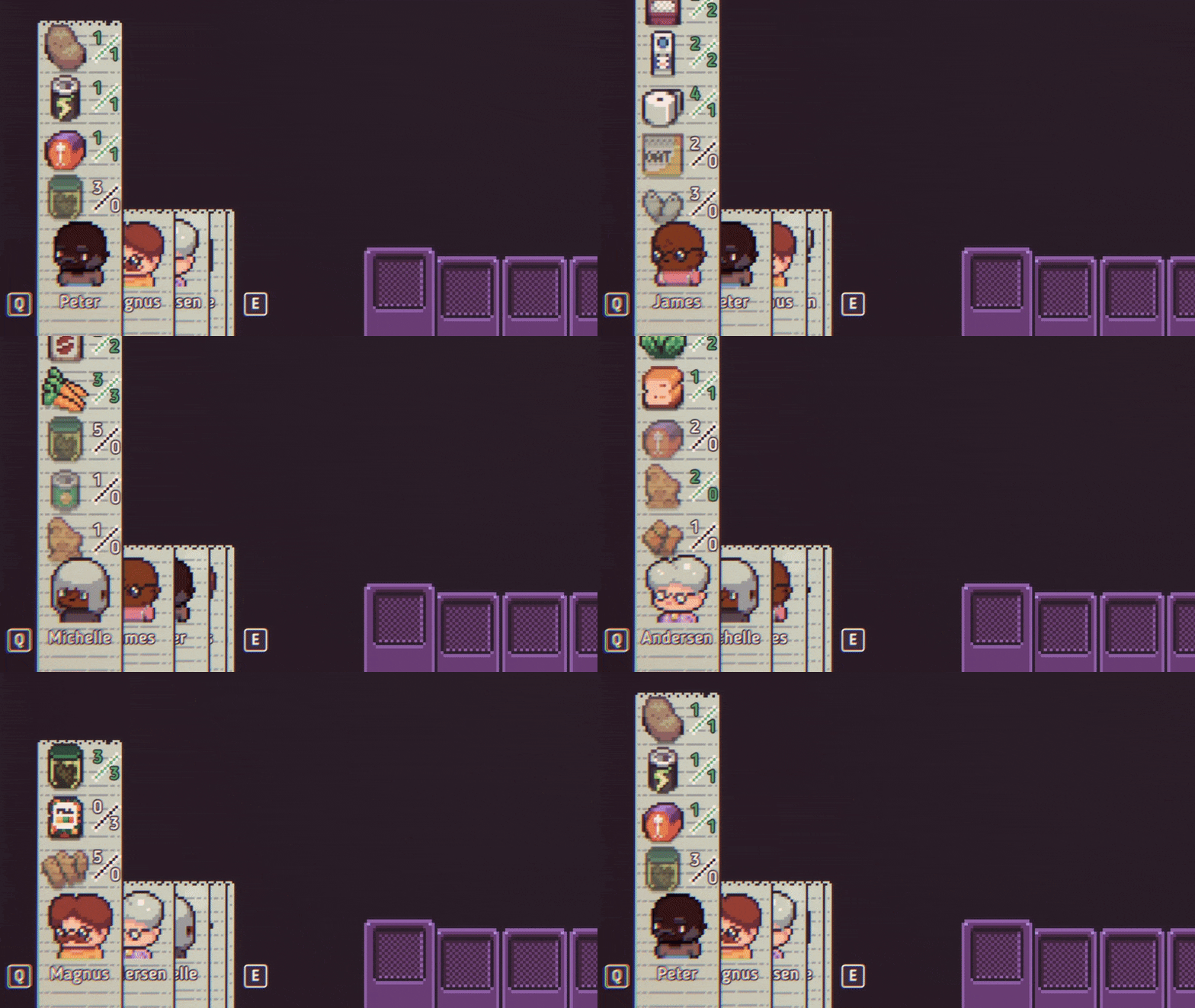
We’ve made a few changes to make life in Blomkest a little bit easier. Now you can tear down posters after placing them, and hovering over a poster shows you a tooltip with the poster’s effect and the number of days it has left. In the store, we’ve greatly improved the shopping list UI. It’s also possible to hide the cash register and scanner guides, so you can more easily keep an eye on your store.
Accessibility Settings
There are now settings to change the size of the dialogue font, as well as having it play automatically and appear instantly! We’ve added a motion sickness mode that disables the scrolling bus in the main menu and also disables UI animations. You can also unlock the scanner from the beginning, access additional visual options, and more.
Appeal Rework
We’ve completely reworked how appeal works, but in short: appealing shelves and boosters work more predictably and are a more worthwhile investment. Previously, in some layouts, customers would almost always go to shelves with the highest appeal rating, even when other appealing shelves were nearby. Now even lower-appeal shelves can also tempt customers, while higher-appeal shelves are nearly irresistible. (We’ve also increased the appeal cap from 5 to 10, and customers can make more impulse purchases overall.) Invest in appeal – it’ll be worth it!
Customer Approval Rating (C.A.R.) Rebalance
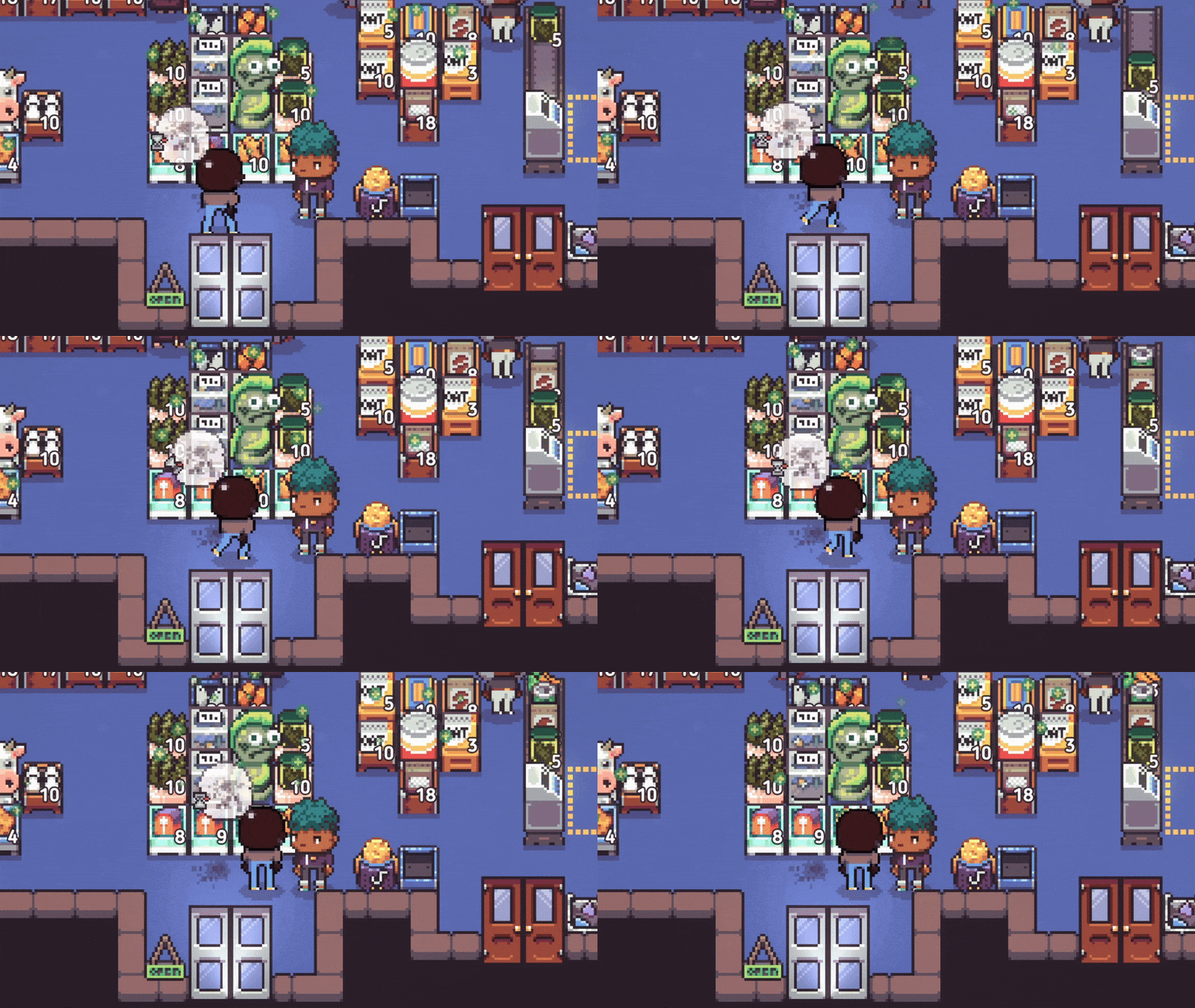
Previously, it was sometimes unclear why customers became impatient and left negative C.A.R. reviews, even when you’d done everything “right.” Now, if you are attentive to all of your tasks, customers are more likely to leave positive reviews – but the inverse is also true, so don’t slack off! We’ve also added visual indicators to show when customers’ patience is draining, so you can more easily identify issues:
“Stress Free” Mode
But what if you don’t want to deal with impatient customers at all? We know there are a lot of players who prefer a purely “cozy” experience, so we’ve added a setting to turn off customer impatience entirely. If you just want to relax – or are traumatized by having worked in retail IRL – this setting might be for you!
Full Patch Notes
🛒 = this change was suggested by players!
Shop Gameplay:
- Customers no longer lose patience while making impulse purchases.
- 🛒 Added visual effect to customers’ shopping lists to indicate when they reach a new impatience level.
- Customers now lose patience faster when standing on dirt or when they can’t find items.
- Shelves and coolers now have a maximum appeal level of 10.
- 🛒 Customers display a dirt with hourglass thought bubble when walking on dirt.
- Added hourglass icon to “can’t find item” thought bubble.
- Customers react more organically to appealing items; high appeal increases likelihood that customers will pick up that item, but they can still pick up less appealing items in the vicinity.
- Added 3-second delay timer for customers making impulse purchases after entering the shop.
- Highlighting a customer no longer highlights their shopping list.
Quality of Life:
- 🛒 Posters can now be removed from walls.
- 🛒 Highlighting posters now brings up a tooltip showing days left and effects.
- Customer shopping lists now stack and can be cycled through with button presses.
- 🛒 Time now slows during the scanner tutorial.
- 🛒 Players can rename their character at any time in the trailer mirror.
- Scanner barcode guide and cash register price guide can now both be hidden with button presses.
- The keyboard arrow keys can now be used to operate the scanner.
- 🛒 Added new popup to the Guy Delivery to prevent orders after 21:00 (previously it appeared like you could place orders).
- Changed English text of “days left” to “day(s) left” on challenges and poster tooltips.
Quests & Dialogue:
- 🛒 Fixed numerous instances of dialogue being able to play at an inappropriate moment of the story.
- Most daily character dialogues can now only be played once per save file.
- 🛒 Vermin Ties: the rat quest has received a lot of polish to clarify objectives throughout the course of the game.
- C.A.R. tutorial cutscene now triggers when the PDA is closed rather than a specific time.
- 🛒 Removed “End the Game” text from dialogue choices.
- 🛒 Added 10 second auto-complete timer for the inventory hotkey tutorial to prevent players with only a trackpad getting stuck.
- 🛒 Changed English text of poster tutorial popup.
Settings:
- 🛒 Added option to change font size.
- 🛒 Added option to make dialogue text appear instantly.
- 🛒 Added options to make dialogue text progress automatically.
- 🛒 Added option to lock cursor to screen.
- 🛒 Added option to pause when unfocused.
- 🛒 Added motion sickness mode (removes scrolling in main menu).
- Added option to turn screen shake off.
- Added option to unlock the scanner from the beginning.
- 🛒 Added option to turn off customer patience mechanics (i.e. customers will never leave a bad review).
- Added fullscreen borderless display option.
- Added volume slider for footsteps.
- Added option to turn Vsync on or off.
System:
- Cutscene priority system: reworked the system that triggers cutscenes to prevent rare bug in which multiple cutscenes could play at once.
- NPC spawning: various improvements to how NPCs are spawned into and out of cutscenes, preventing an occasional bug in which NPCs could teleport to weird locations after cutscenes.
Polish:
- Allowed placing waste barrels in basement and storage room.
- Allowed throwing out Fishmas Sticks at BloRSt.
Bug Fixes:
- 🛒 Fixed Chester getting stuck when you pick up a shelf he’s carrying items for.
- 🛒 Fixed getting stuck in the intro cutscene for the Fishy Business quest when Fisher’s delivery area is full.
- Removed long wait time after finishing certain cutscenes.
- 🛒 Fixed bug in which posters could be printed instantly.
- Fixed customer dialogue appearing in front of cash register & scanner guides.
- Fixed various typos and inconsistencies.
- Fixed numerous instances of jank when starting or finishing certain cutscenes (NPCs appearing or disappearing too early, fades not working properly, NPCs facing incorrectly, wonky camera movements, sudden time changes.)
- Fixed visual issue with paint on Solruna’s altar.
- Fixed being able to interact with the farm rat bowl too early.
- Fixed newspaper not spawning properly after Resolutions quest.
- 🛒 “It’s A Deal” Achievement will now be retroactively applied to saves that should have gotten this achievement.
- 🛒 Fixed Dollhouse item not being delivered properly.
- Fixed Tellar’s walking paths in her introductory cutscene.
- Fixed being able to purchase item category discounts with insufficient reward points.
- Fixed unnecessary wait times after certain cutscenes.
- Fixed unpurchased item bin not properly changing appearance after being emptied.
- Fixed Salmon item displaying incorrect colors in dialogue.
- Fixed animation error with unpurchased item bin.
Fixed challenge notifications not sorting above the in-game PC user interface. - Fixed overexposed lights in Guy’s truck during the day.
- Fixed items sometimes not being pixelated during animation.
- Fixed time running when walking through doors.
- Fixed trigger size of first delivery cutscene to prevent multiple cutscenes from playing at once.
- Fixed some decorative items being difficult to pick up using a controller.
- Fixed “Opening in 30 minutes” popup showing after tutorial.
- Fixed poster remnants showing above newer posters (removed remnants visual from game).
Fixed off-center dialouge appearing when returning to the main menu and starting a new game. - Fixed a null ref in the end-of-day shop report.
- Fixed it being difficult to select the PC or compactor using a controller when Grace is also in the office.
- Fixed drink still being highlighted in the bar even after viewing final friendship event.
- Fixed path error for Ms. Andersen entering the bank.
- Fixed errors in C.A.R. calculations in mornings, after Sundays, and after skipped story days.
Let us know what you think about the update, and until next time,
xoxo
PQube & Crinkle Cut Games
